Internal linking is the SEO task everyone agrees matters and nobody keeps up with. Every post you publish changes the shape of your site a little, and the links you added six months ago slowly stop describing it. Eventually you have pages nothing points to, links pointing at posts you deleted, and no idea which is which.
Automation fixes a specific part of that problem. It does not fix all of it, and the tools that claim otherwise are the ones you should trust least.
This guide covers what internal linking automation can genuinely do, where it should never be left alone, how the matching actually works under the hood, and how to set it up on WordPress. It also flags some widely repeated statistics that fall apart when you look for the source — including a few we were about to repeat ourselves.
What automation actually solves
The hard part of internal linking was never adding the link. It is knowing where the links are missing.
Google is explicit about why this matters. Its documentation on crawlable links states that every page you care about should have a link from at least one other page on your site, and that Google uses links both to judge relevance and to find new pages to crawl. A page with no inbound internal links is not penalised as such — it is simply harder to find, and it receives none of the internal authority the rest of your site is passing around.
Finding those pages by hand means listing every URL, listing every internal link, and subtracting one from the other. That is a spreadsheet exercise, and it goes stale the moment you publish again. It is exactly the kind of work software should be doing.
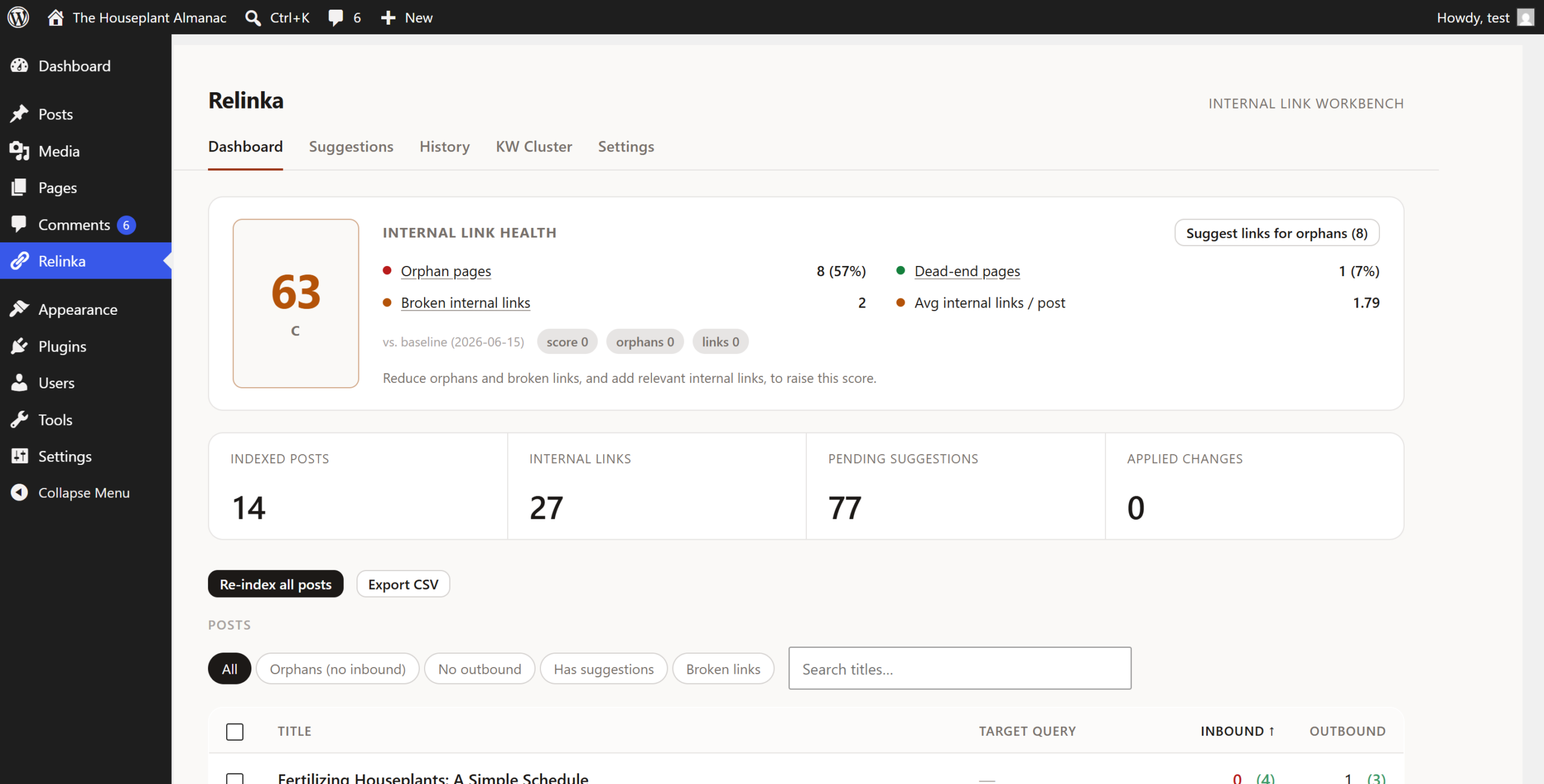
So the honest scope of internal linking automation is:
- Finding orphan pages — published posts with no inbound internal links.
- Finding broken internal links — links pointing at posts that were renamed, unpublished, or deleted.
- Surfacing candidates — for a given post, which of your other posts are topically close enough to be worth linking.
- Proposing placement — where in the text a link could go, and on which phrase.
Notice what is not on that list: deciding whether a link should exist. That judgment is still yours, and the rest of this guide is largely about protecting it.
How the matching works: keyword versus semantic
There are two ways a tool decides that two posts are related, and the difference shows up in the quality of what it suggests.
Keyword matching compares the words that appear in each post. Full-text relevance scoring — the kind MySQL itself can do — ranks candidates by shared terms, weighted so that rarer words count for more. It is fast, transparent, and needs nothing beyond your own database. Its weakness is vocabulary: two posts about the same subject that use different words for it will not match, and a post that happens to share a common word will match when it shouldn’t.
Semantic matching converts each post into a vector — a numeric representation of its meaning produced by a language model — and compares the distance between vectors. Two posts can be scored as closely related with no shared vocabulary at all. This is what “AI-powered” means in this category, in practice.
Semantic matching is better at recall. It is not automatically better at judgment, and it costs something: either the vendor runs the model and meters you for it, or you supply your own API key.
One detail worth understanding, because it affects how you read every tool’s UI: relevance scores are usually normalised per post. The best candidate for a given post tends to score at or near the top of the scale whether that candidate is genuinely excellent or merely the least bad option available. A score of 1.00 next to a suggestion does not mean “certainly related.” It means “the strongest match we found for this post.” Treat the score as a ranking within one post’s options, not as an absolute measure you can compare across your site.
What the evidence actually shows
This is where most articles in this category start quoting numbers. We went looking for the sources behind the ones we had drafted, and most of them did not survive.
What holds up:
- SearchPilot’s split test on internal linking. Adding internal links to category pages produced a 25% uplift in organic traffic — an estimated 9,200 additional organic sessions per month. Both the linked-to and the linking page groups showed independent uplifts of over 20%, meaning the benefit was not simply moved from one page to another. This is a controlled test against a control group, published with methodology, and it is the strongest single piece of public evidence in this space.
- Google’s own guidance, cited above: every page you care about should be linked from at least one other page.
- The PageRank damping factor of 0.85, from Brin and Page’s original 1998 paper, which is where the familiar “authority decays about 15% per hop” idea comes from. Useful as a mental model of why deeply buried pages struggle. It is not a description of how Google ranks pages today.
What did not hold up — and you will see all of these repeated confidently:
- “About 12% of pages on the average site are orphans.” The only source we could trace is a tool vendor’s own marketing page, which cites no study, dataset, or methodology. It is not industry research.
- A frequently cited split test attributed to a major SEO platform, quoting a specific URL count and a 99.8% confidence level. We could not find that test published anywhere; the vendor’s actual internal-linking case studies report entirely different figures.
- “Sites with topic clusters earn 3.2× more AI citations.” The underlying research it is attributed to is real, but contains no mention of topic clusters and no 3.2× figure. (The real finding in that study is about original research content, not clustering.)
- Per-article time costs — “2 to 3 hours of internal linking per post,” “80 to 250 hours at 1,000 pages.” We found no source for any of these. They are plausible, which is exactly why they spread.
We are pointing this out for a practical reason, not a rhetorical one. If you are building a business case for automation, build it on the SearchPilot test and on your own orphan count — a number you can measure today — rather than on figures that dissolve when you click through.
The decision matrix: what to automate, what to never automate
This is the part that actually determines whether automation helps or hurts you.
| Task | Automate? | Why |
|---|---|---|
| Finding orphan pages | Yes, fully | Pure detection. No judgment involved. |
| Finding broken internal links | Yes, fully | Same. |
| Generating link candidates | Yes | Machines are better than you at holding 500 posts in mind at once. |
| Choosing the anchor phrase | Review | The phrase has to already belong in the sentence. |
| Linking to money pages | Never unattended | Pricing, signup, contact. Wrong anchor here costs revenue, not rankings. |
| Bulk-applying across a whole site | Only with a preview | The failure mode is dozens of posts changed at once. |
| Linking newly published posts | Yes, with approval | The highest-value habit, and the one people drop first. |
The pattern is simple: automate detection completely, automate proposal freely, and keep approval human wherever the page has a job to do beyond ranking.
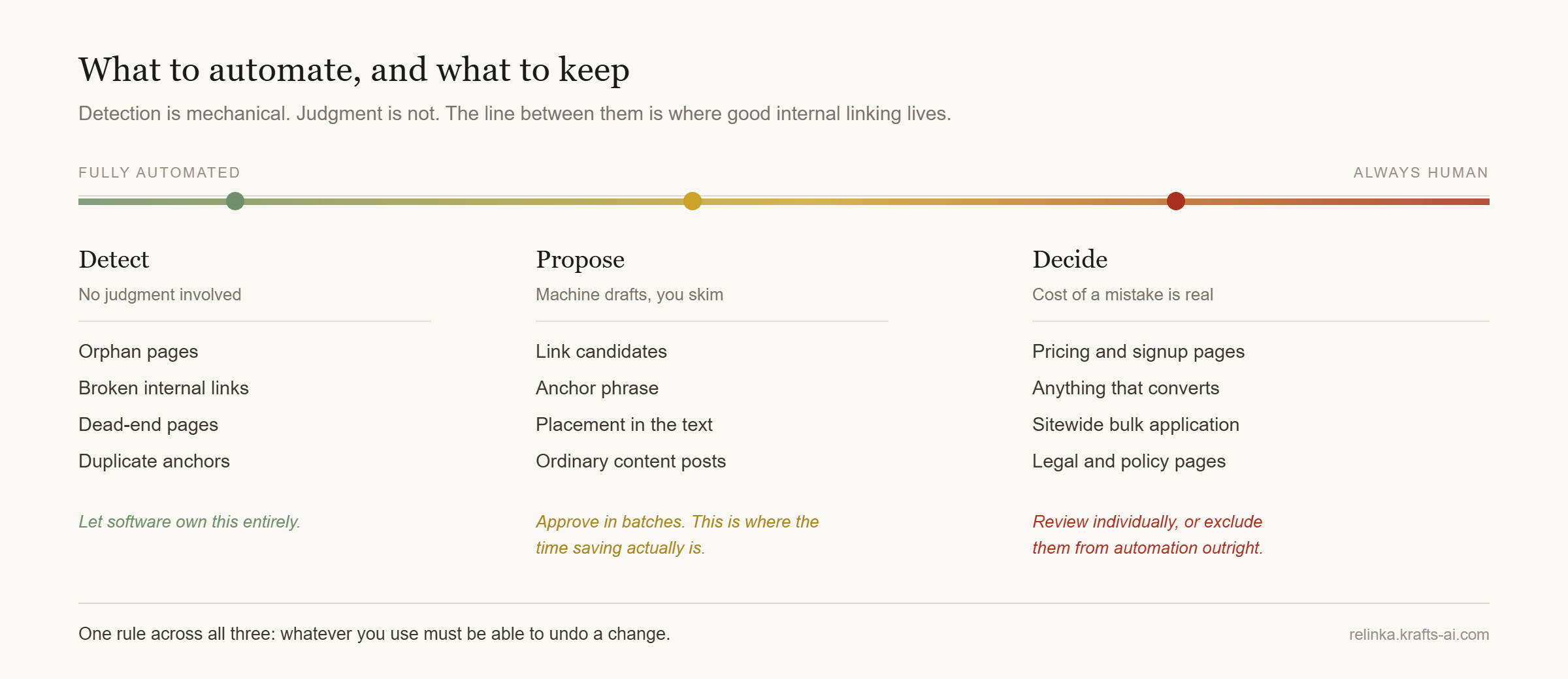
A practical workflow that respects that:
- Let the tool scan the whole site and generate candidates in bulk.
- Approve in batches for ordinary content posts — this is where the time saving is real.
- Review individually for anything commercial, and for any page you would be unhappy to see changed.
- Re-audit monthly for broken links and duplicate anchors.
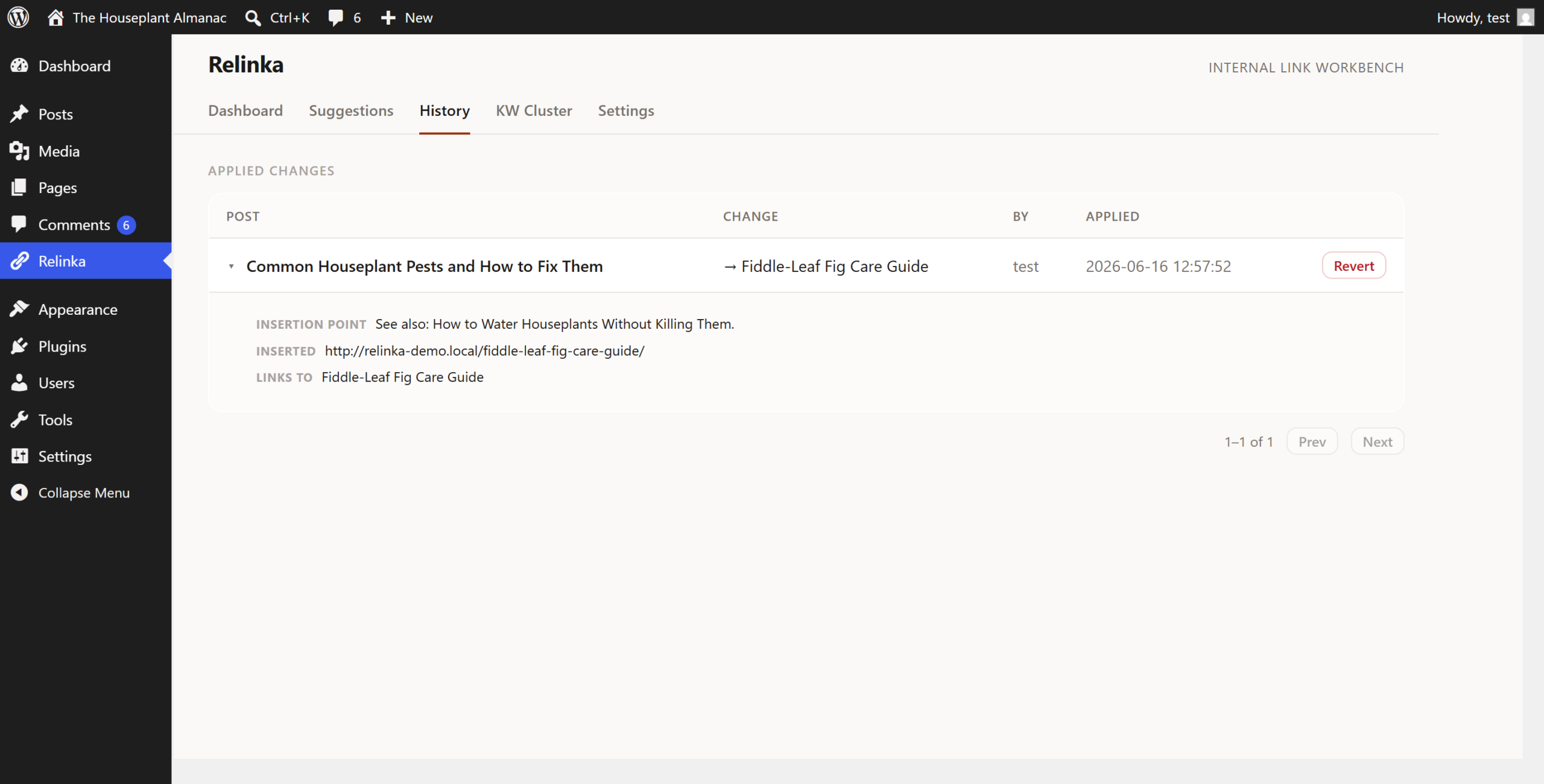
The one rule worth enforcing without exception: whatever you use must be able to undo a change. Bulk application without a revert is how a good idea becomes a weekend of manual cleanup.
Guardrails that keep automation from hurting you
Google does not prohibit automated internal linking. What it asks is that anchor text be descriptive, concise, and relevant to the destination — the same standard a human editor would apply. We set out the full test in automatic internal linking, done safely. Problems come from volume and repetition, not from automation itself.
Anchor text. Industry convention — and it is convention, not official guidance, so treat the numbers as a shape rather than a rule — runs roughly: partial-match phrases for the bulk of your links, exact-match kept to around ten percent or below, and the remainder branded or generic. The reason exact-match is capped is not a penalty threshold; it is that a page linked ten times with an identical phrase reads as optimisation rather than editing.
Density. A common rule of thumb is one contextual internal link every 200–300 words. You will see much denser figures quoted; they are not supported by anything we could find. If a paragraph has two links in it, one of them is probably load-bearing and the other is probably noise.
Keyword cannibalisation. This is the real risk with automated anchors. If the same phrase points at three different URLs, you have told the search engine that three pages compete for it, and none of them will do as well as one would. Monthly audit: export every internal link with its anchor, flag any anchor pointing at more than one URL, decide which URL owns that phrase, and repoint the others.
Exclusions. Set them once, at the start: terms of service, privacy policy, checkout, thank-you pages. Nothing good happens when an automated linker discovers your legal pages.
Choosing a tool
Prices and terms below were checked on each vendor’s own pages in August 2026; verify before you buy, because this category changes them often.
| Relinka | Link Whisper | LinkBoss | Internal Link Juicer | |
|---|---|---|---|---|
| Free version | Yes — full toolkit on WordPress.org | No free plugin | Yes, on WordPress.org | Yes, on WordPress.org (90k+ installs) |
| Paid | $59 / $129 / $249 per year (1 / 5 / unlimited sites) | $97–$497 per year (1 / 3 / 10 / 50 sites) | $11–$549 per month, or $87–$4,941 per year, credit-metered | $69.99–$1,299 per year |
| How AI is powered | Pro only, on your own Gemini API key (BYOK) | Vendor-hosted, AI credits bundled per plan | Vendor-hosted, metered in credits | No AI — keyword matching |
| Search Console integration | No | Yes, included in paid plans | Yes, free | No |
| Undo | One-click revert with before/after snapshot | One-click accept; auto-linking is opt-in | Not documented on public pages | Links rendered at output; managed by rules |
Read that table for fit, not for a winner:
- If you want Search Console data tied to your link suggestions, LinkBoss offers it free and Link Whisper bundles it. Relinka does not have it at all.
- If you want vendor-hosted AI with nothing to configure, Link Whisper and LinkBoss include it in the price. Relinka’s AI requires you to bring a Gemini key, which is cheaper at volume and means your content is processed under your own account — but it is a step to set up.
- If you want automation with no AI and no cost, Internal Link Juicer has done keyword-based auto-linking for years and has the install base to show for it.
- If you want to see your whole link structure — orphans, broken links, a health score — before paying anything, that is what Relinka’s free version is for.
Setting it up on WordPress with Relinka
Full disclosure: we build Relinka. Here is precisely what the free version does and does not do, because getting this wrong is how tools lose trust.
The free version finds orphan pages, finds broken internal links, scores your internal-link health from 0 to 100, maps a keyword cluster graph, and suggests relevant internal links with a one-sentence reason for each. Every suggestion is approved individually or in bulk, and every applied link can be reverted from a before/after snapshot. It runs entirely on your own server. There is no account, no API key, and no monthly quota — and there is no AI in it. Suggestions come from full-text relevance against your own content.
Pro adds semantic matching and an LLM that picks the anchor phrase, placement and reason, plus bulk apply and auto-linking on publish. It runs on your own Google Gemini key. Your content is sent to Google’s API under your account and to nowhere else.
Setup takes about three steps:
- Plugins → Add New, search for Relinka, install and activate.
- Open Relinka in the admin menu and choose which post types to index.
- Run the index.
When it finishes you get the full picture: orphans, dead-end pages, broken internal links, and a health score, with suggestions ready to review. Start with the orphans — it is the shortest path from “this is a mess” to a measurable improvement, and we walk through it step by step in how to find and fix orphan pages in WordPress.
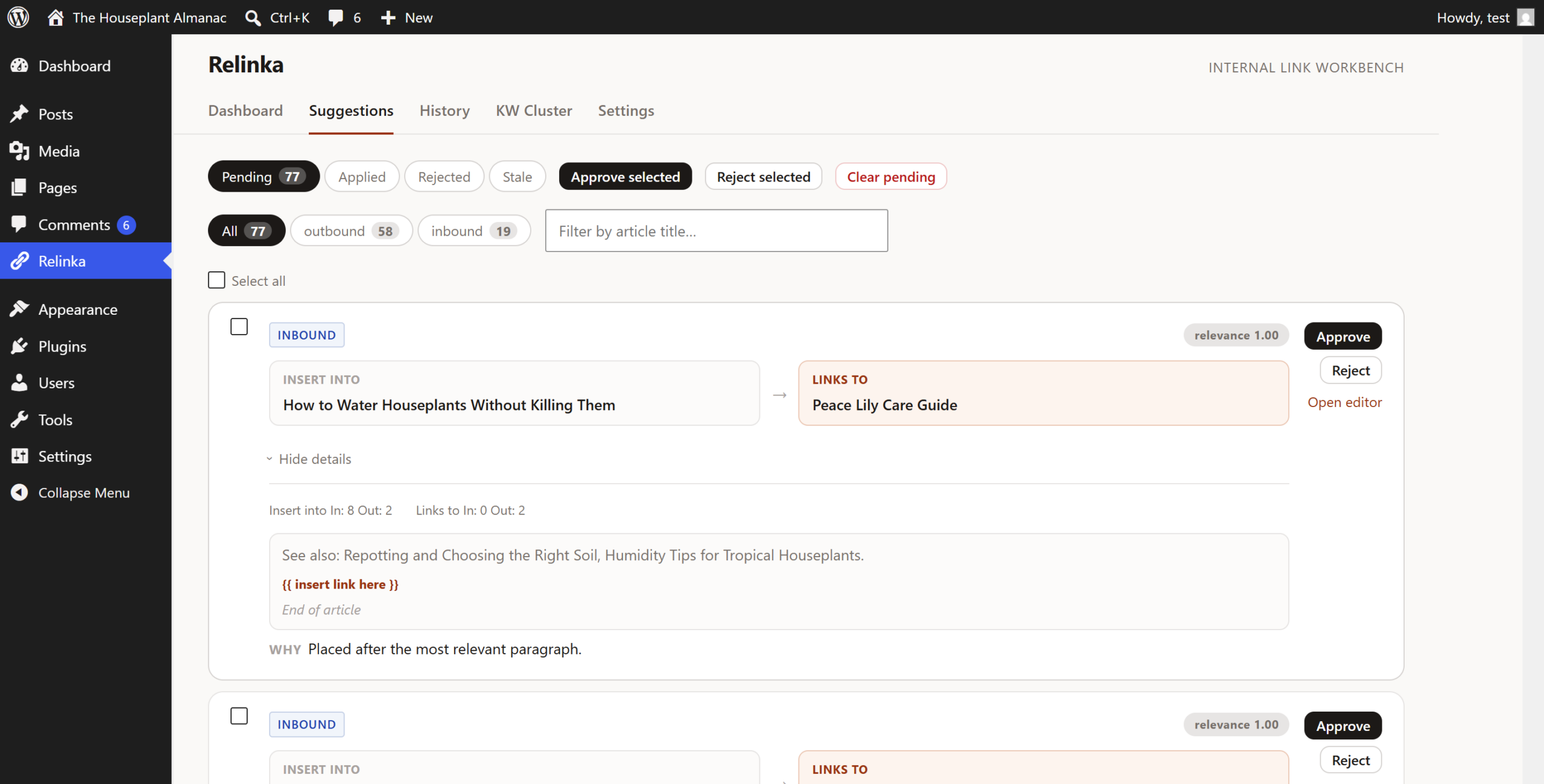
One thing worth knowing before you generate: suggestions come in two shapes. Most wrap a phrase that already exists in your text. Where no suitable phrase exists, Relinka offers a related-link card instead — labelled as such in the list, capped at two per post so an article never fills up with them. You approve either kind before anything is written.
Where to start
If you take one thing from this: run an orphan scan before you decide anything. The number it returns is the only honest input to the question of whether you need automation, and it takes five minutes to get.
If the number is small, you do not have a linking problem — you have a habit to maintain, and one link from an older post per publish will keep it that way. If it is large, automate detection and candidate generation immediately, keep approval human for anything that sells something, and re-audit monthly.
The tools are all converging on the same features. What separates a good outcome from a bad one is still the part you kept for yourself.